

Key Takeaways
- Smart security works best as a coordinated system rather than isolated individual devices.
- Camera resolution, field of view, and storage method matter more than feature count.
- Video doorbells combine visitor detection, two-way audio, and package monitoring in one unit.
- Smart locks should be evaluated on certification rating, not just connectivity features.
- Compatibility with your existing Wi-Fi ecosystem prevents costly rework later.
- Privacy settings and network security are essential steps before any device goes live.
How Smart Security Devices Fit Together
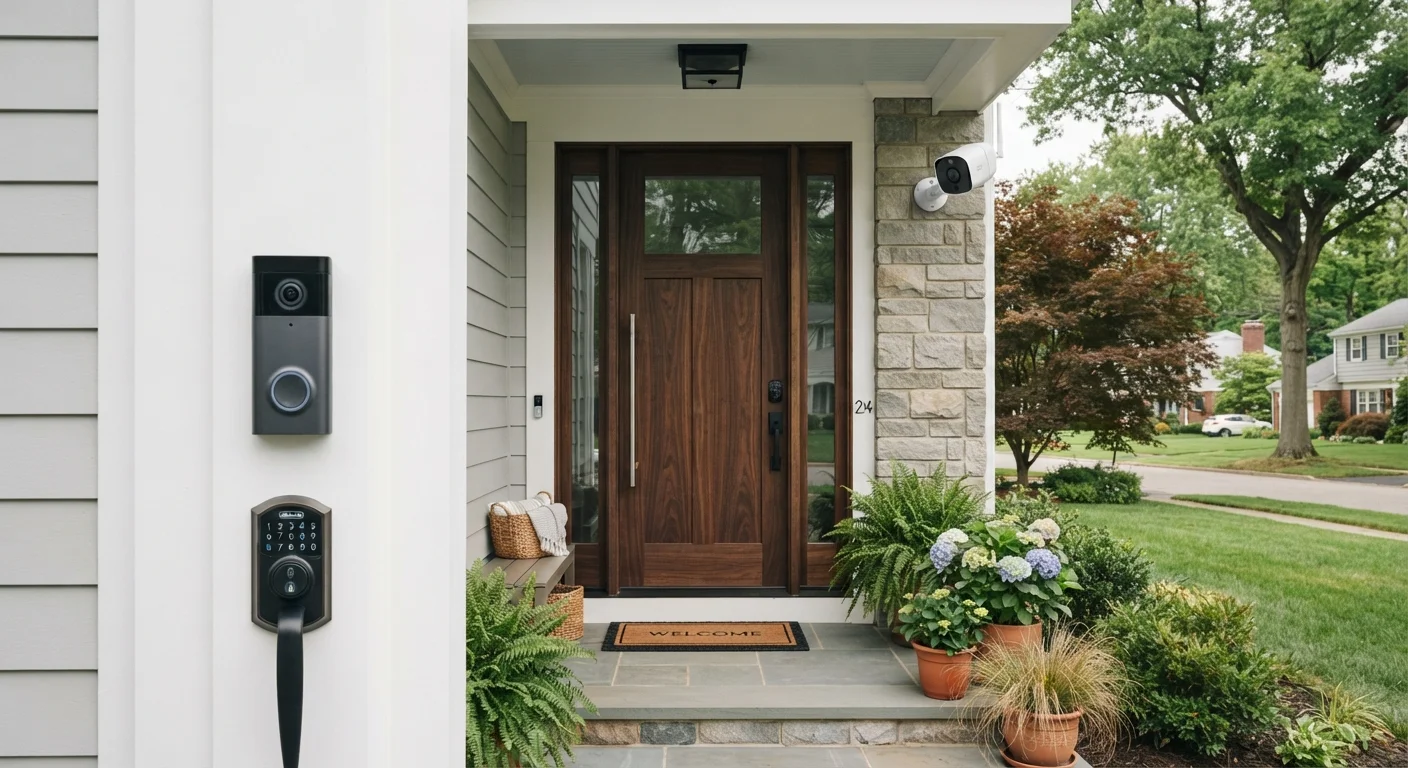
Smart security is not a single product - it is a category of devices designed to give you awareness and control over who approaches, enters, and moves through your home. The three core device types are outdoor cameras, video doorbells, and smart locks. Each addresses a different part of the security picture, and each works best when it communicates with the others.
Think of it as layers: cameras extend your awareness across the property, doorbells manage the front-door interaction point, and smart locks control physical access. When these layers share a common platform - such as a smart home app or voice assistant ecosystem - you can respond to events in sequence. A camera detects motion, your doorbell alerts you to a visitor, and your lock lets in a trusted person remotely, all without you leaving your couch or office.
Before purchasing any device, it helps to understand how your home network supports these products. Our network readiness checklist walks through router placement, bandwidth, and security settings that directly affect how reliably these devices perform.
~35%
US households with at least one smart security device
Industry research from multiple sources consistently places smart security device adoption among US households in the mid-thirties percentage range as of recent years.
34%
Home break-ins through the front door
According to FBI crime data, the front door is the most common point of entry in residential burglaries, reinforcing the doorbell and lock layer as a priority.
72 hrs
Typical free cloud video retention window
Many camera manufacturers offer roughly 24-72 hours of free cloud storage before footage is overwritten, with longer retention requiring a paid subscription.
Smart Cameras: What the Specs Actually Mean
Security cameras are rated on several specifications that can feel overwhelming on a product page. Here is what each one actually means for everyday use.
- Resolution: 1080p (Full HD) is generally sufficient for identifying faces and license plates at close range. Higher resolutions improve detail but increase storage demands and upload bandwidth.
- Field of view (FOV): Measured in degrees, a wider FOV (130°+) covers more area but can distort edges. Match the FOV to your specific coverage goal - a narrow driveway versus a wide backyard calls for different angles.
- Night vision: Infrared (IR) night vision is standard and produces black-and-white footage. Color night vision uses a supplemental light source and is useful for identifying clothing or vehicle color.
- Storage: Cameras store footage either locally (on an SD card or home hub) or in the cloud (via a subscription). Local storage has no recurring cost but can be lost if a camera is stolen. Cloud storage is more resilient but adds ongoing fees.
- Power source: Wired cameras offer continuous power and recording. Battery-powered cameras are easier to position but require periodic recharging.
When placing outdoor cameras, prioritize overlapping coverage at entry points rather than maximizing total area covered. A second camera angle on the front door is more useful than a single camera covering the entire backyard.
Overlapping angles eliminate blind spots and provide backup footage if one device is obstructed or tampered with - a principle used in professional security installations.
Before committing to a camera's cloud storage plan, calculate the monthly cost over three years and factor it into your total device cost. What appears to be an affordable camera can become expensive when the subscription is included.
Storage subscription costs frequently exceed the device's purchase price within 18-24 months, and families often underestimate this when comparing options.
Video Doorbells: More Than a Doorbell
A video doorbell replaces your standard doorbell button with a camera, microphone, speaker, and motion sensor - all in one compact unit. When someone approaches your door, the device can alert your phone before the visitor even presses the button. This is particularly useful for package delivery notifications and for households where children or elderly family members answer the door.
Key evaluation points include:
- Motion detection zones: Look for adjustable zones so you avoid constant alerts from passing cars or pedestrians on the street.
- Two-way audio latency: A noticeable delay in audio makes real-time conversation awkward. Check user reviews specifically for audio quality, not just video.
- Wired vs. battery: Wired doorbells (replacing an existing chime system) provide steady power and often support continuous video recording. Battery models require no wiring but need recharging every few weeks to months depending on activity level.
- Chime compatibility: Some doorbells work with your existing interior chime; others require a separate plug-in chime unit. Verify this before installation.
For households already exploring connected home ecosystems, our guide to building your first smart home explains how to choose platforms that allow security devices to work alongside lighting, thermostats, and other systems.
Test Audio Before You Install Permanently
Video doorbells are often evaluated on video quality alone, but audio is equally important for real-world use. Before mounting permanently, power the device and run a live test at the distance a visitor would stand. Background noise, speaker volume, and latency all affect whether you can have a natural conversation through the device.
Smart Locks: Keyless Entry Explained
A smart lock replaces or augments the deadbolt on your exterior door and allows entry through a keypad code, a smartphone app, a fingerprint, or proximity detection - with most models retaining a physical key override as a backup.
When evaluating smart locks, the most important - and most overlooked - factor is the lock's physical security grade, not its connectivity features. In the US, the ANSI/BHMA grading system rates residential locks on Grade 1 (commercial-grade, highest resistance), Grade 2 (standard residential), and Grade 3 (basic). A smart lock with excellent app features but a Grade 3 rating offers weaker physical security than a simple Grade 1 deadbolt. Prioritize the physical rating first.
Secondary considerations include:
- Connectivity protocol: Smart locks connect via Wi-Fi, Z-Wave, Zigbee, or Bluetooth. Wi-Fi locks work without a hub but use more battery power. Z-Wave and Zigbee locks need a compatible hub but are generally more battery-efficient and reliable in crowded wireless environments.
- Access code management: The ability to create, schedule, and delete temporary codes is essential for letting in housekeepers, contractors, or guests without duplicating keys.
- Auto-lock: Automatically re-engages the deadbolt after a set period - a simple but effective safeguard against forgetting to lock up.
Physical Lock Grade Comes First
No amount of smart connectivity compensates for a weak physical lock mechanism. Before evaluating app features, check the ANSI/BHMA grade printed on the lock's packaging or listed in its specifications. Grade 1 is the standard recommended for exterior residential deadbolts. A poorly rated lock body with a sophisticated app is still a poorly rated lock.
Compatibility, Privacy, and Network Readiness
One of the most common frustrations with smart security devices is discovering - after purchase - that they don't work with the rest of your setup. Compatibility has two dimensions: platform compatibility (does it work with your smart home app, voice assistant, or hub?) and protocol compatibility (does it speak the same wireless language as your other devices?).
The Matter standard, introduced by the Connectivity Standards Alliance, is gradually making cross-brand compatibility more reliable. However, not every device on the market supports it yet. Always verify current compatibility before purchasing rather than relying on marketing language like "works with most smart home systems."
Privacy is equally important. Security cameras and doorbells continuously collect video - and in some cases audio - data. Understanding where that data is stored, who can access it, and how long it is retained is not optional reading in the fine print. Our in-depth look at smart home privacy and data collection explains what connected devices gather and how to apply practical limits.
Local Laws on Audio Recording Vary
Video doorbells and outdoor cameras with microphones may be subject to state and local laws regarding audio recording consent. Rules differ significantly across US states - some require all parties to consent before audio is recorded. Check your local regulations before enabling audio features on any outdoor device, particularly if the microphone can pick up conversations from a public sidewalk or neighboring property.
Building a Layered Security Strategy
The value of smart security comes from how the devices interact, not from any single product in isolation. A practical layered strategy for most households follows three principles:
- Perimeter awareness first: Position outdoor cameras to cover entry points - front door, garage, side gates, and any ground-floor windows in low-visibility areas. The goal is visibility, not surveillance of every inch of your property.
- Active notification management: Configure motion sensitivity and alert schedules to reduce alert fatigue. A camera that sends 40 notifications a day trains you to ignore them. Targeted zones and time-based rules help keep alerts meaningful.
- Access control as the final layer: Smart locks and doorbell cameras should work in tandem. When the doorbell detects a visitor, you should be able to verify identity and, if appropriate, unlock the door - all from the same app.
Automation can reinforce this layering. For example, setting your smart lock to trigger an exterior camera recording when the door is unlocked after dark is a useful routine that requires minimal technical skill once devices share a common platform.
If you are encountering conflicting information about what smart home security can and cannot do, our smart home myths guide addresses the most common misconceptions - including why "they all just work together" is rarely true out of the box.
Smart security is not about eliminating all risk - no technology can do that. It is about reducing uncertainty, staying informed, and making access to your home deliberate rather than passive. With a clear understanding of each device's role and realistic expectations about compatibility and setup, most families can build a reliable system without significant technical expertise.